Choosing a tool
Wedding game apps compared: which one suits your wedding?
We make a wedding game app, so read this knowing that. We've tried to be fair: every tool here is good at something, and for some weddings the right answer is a printed sheet and a pen. Prices and features change, so check each tool's own site before you decide.
By The Knot Party team · Published · 5 min read
What actually matters at a wedding
Wedding games are different from classroom quizzes or office team-building, and the differences decide which tool works. Before comparing anything, it helps to know what to look for:
- Joining: can a 75-year-old join in ten seconds, without an app or an account?
- Reading: can guests read the question on their own phone, or do they need to see a screen at the far end of the room?
- Games: does it do wedding formats (the shoe game, bingo, table teams), or only quizzes?
- No screen: does it still work in a marquee or restaurant with no projector?
- The MC: can one person run it from a phone, with no laptop to babysit?
- Price: one payment for one event, or a subscription you need to remember to cancel?
The options
Kahoot
Kahoot is the best-known live quiz tool, used in schools and offices everywhere, and it has wedding quiz templates. Guests join at kahoot.it with a game PIN, or by scanning a code. In Kahoot's classic format, the question is shown on the host's shared screen and players tap a coloured shape on their device, which works well when everyone can see the screen. It's polished, reliable and familiar to many guests under 40. Its free plan limits how many players can join, and paid plans are sold as monthly or annual plans; check the current terms. Best for: a couple who want a straightforward quiz and have a good screen. We've written more in Kahoot for weddings: what works and the alternatives.
AhaSlides
AhaSlides is an interactive presentation tool: slides with polls, quizzes, word clouds and Q&A that an audience answers on their phones. It has wedding quiz templates and is flexible if you want to mix a slideshow with interactive moments. Like most presentation tools, it's designed around a presenter with a laptop and a screen. It has a free plan with limits on audience size; check its current plans. Best for: a couple or MC comfortable building a presentation, who want a slideshow and a quiz in one.
Renmory
Renmory is a newer tool that describes itself on its Product Hunt listing as "Kahoot for weddings": the couple set up custom avatars that host a trivia game, guests play on their phones, and animations play on the venue's big screen. It's built specifically for weddings. We haven't used it at an event, so check its site for current features and pricing. Best for: couples who want a wedding trivia game with a personalised, animated feel.
Printable game kits
Printable wedding game bundles (bingo cards, shoe game question lists, quiz sheets, advice cards) are sold cheaply online, and plenty are free, including ours. They need no technology, no signal and no screen, and some guests prefer pen and paper. The costs are time: printing, cutting and, for quizzes, marking sheets at the end. Best for: small weddings, venues with no signal, and anything that doesn't need scoring, like advice cards.
Knot Party (ours)
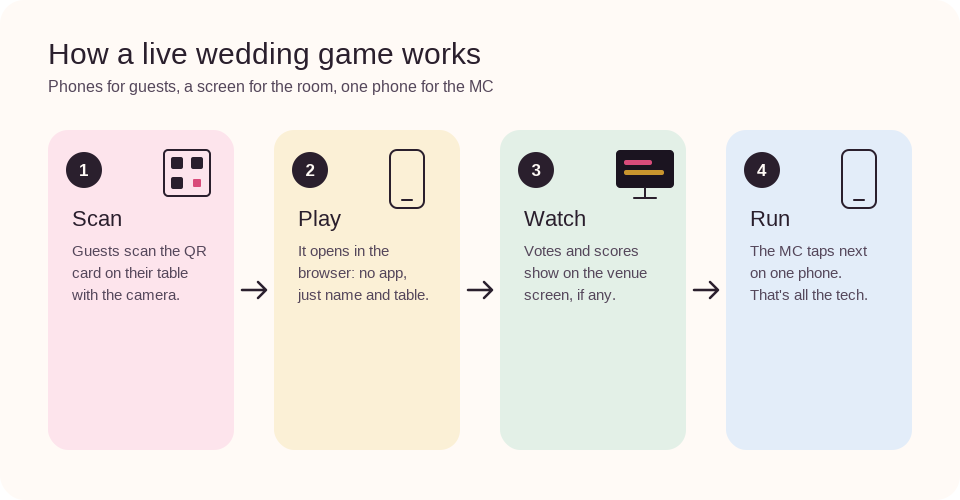
Knot Party is built only for weddings, showers and bachelorettes. Guests scan a QR code and play in their phone's browser, with the question and answers on their own screen. It does wedding formats rather than only quizzes: the shoe game with guests voting before the shoes go up, bingo with a different card on every phone, table vs table, and an advice wall. The MC runs it from one phone; the venue screen is optional. It's free for every event until 28 February 2027; after that, bingo, the advice wall and predictions stay free, and the full set of games is a one-time price per event, never a subscription. What it doesn't do: general presentations, or anything outside wedding-type events.
Side by side
| Knot Party | Kahoot | AhaSlides | Renmory | Printables | |
|---|---|---|---|---|---|
| Built for weddings | Yes | General quiz tool, wedding templates | General presentation tool, wedding templates | Yes | Yes |
| Guests join with | QR code, browser | PIN or code, browser or app | Link or QR code, browser | Phone (see its site) | Pen and paper |
| Works without a screen | Yes | Best with a screen | Best with a screen | Designed around a big screen | Yes |
| Wedding formats | Shoe game, bingo, tables, advice, quizzes | Quizzes, polls | Quizzes, polls, word clouds | Trivia | Whatever you print |
| Pricing model | Free during launch; then free tier + one-time price | Free tier + paid plans | Free tier + paid plans | See its site | Free to a few dollars |
How to choose
- If you want only a quiz and your venue has a great screen, a general quiz tool will do the job, and your guests may already know it.
- If you want a slideshow with interactive moments, a presentation tool is the natural fit.
- If you want several wedding games across the evening, playable without a screen and run from one phone, a wedding-specific tool fits better.
- If your venue has no signal, or your guests are mostly older and you're not sure about phones, print.
Do guests need to download an app?
For a wedding, avoid anything that requires guests to install an app. A few won't have space, some won't know their app store password, and the five minutes it takes is five minutes of the reception. Browser-based tools (Knot Party, Kahoot's web player, AhaSlides) avoid the problem.
For an overview of the games themselves, see our guide to wedding games for guests and the full games list.
Part of our guide to wedding games for guests.